안녕하세요! 데브구일입니다 :D
이번엔 로터리 차례입니다!
제가 핀을 잘 못 연결했다고 했잖아요?
그래서 저는 납땜도 수정을 해야합니다. ㅠㅠ
아래 처럼 저는 납땜을 수정했어요! ㅠ
앞부분에 나온 포스팅은 모두 수정사항이 적용된 상태입니다.
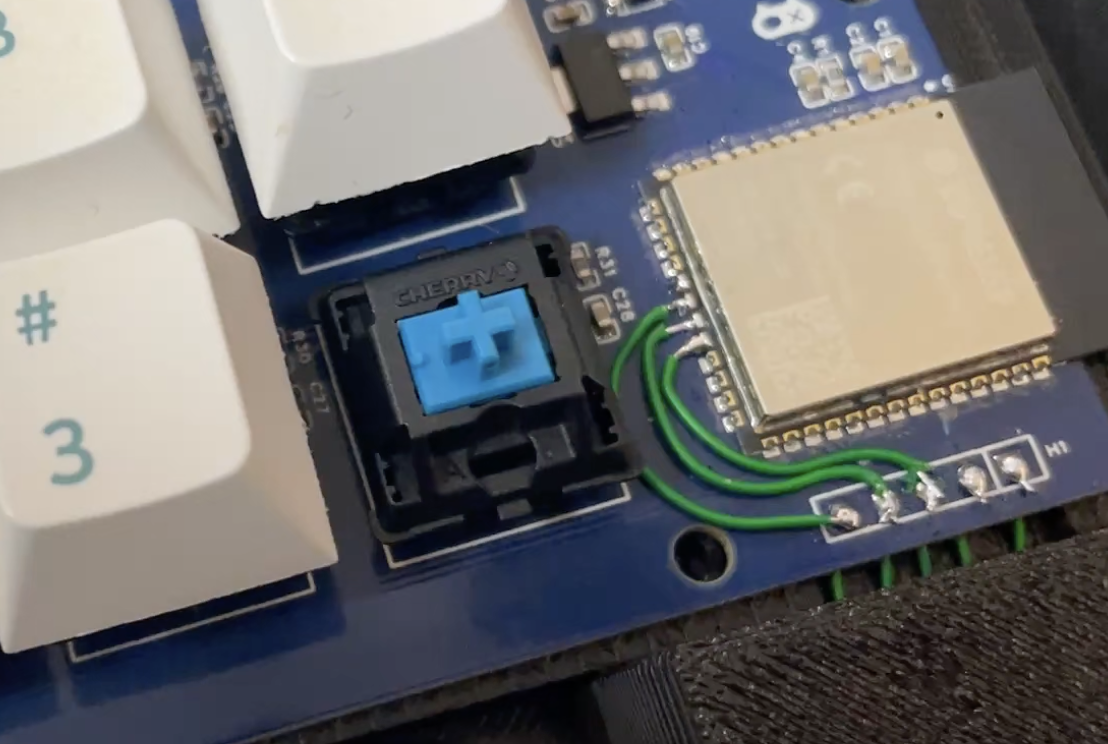
이렇게 핀을 수정했고!
이제 코드를 조금 더 손봐줄게요!
저번 포스팅에 있던 코드에 추가로 로터리 코드가 추가될 건데요!
로터리 엔코더는 휠 스크롤 기능을 구현 할 생각이에요!
아래 코드를 추가하시면 로터리의 입력되는 포지션에 따라 휠이 동작하게됩니다!
static void rotary_encoder(void)
{
    // Poll-driven rotary encoder reader with mouse wheel scroll
    static bool initialized = false;
    static int last_ab = 0;           // last encoded state of A/B
    static int32_t position = 0;      // accumulated steps
    static int32_t last_position = 0; // last reported position
    static bool last_sw = true;       // pull-up active
    static uint32_t last_sw_ms = 0;   // debounce timer

    if (!initialized) {
        const gpio_config_t cfg = {
            .pin_bit_mask = BIT64(ROTARY_PIN_A) | BIT64(ROTARY_PIN_B) | BIT64(ROTARY_PIN_SW),
            .mode = GPIO_MODE_INPUT,
            /* input-only pins don't have internal pull‑ups, but setting the flag
               makes no harm and keeps code consistent if you later move to a
               normal GPIO.  External 10 k pull‑ups shown in your schematics are
               left in place. */
            .pull_up_en = false,
            .pull_down_en = false,
            .intr_type = GPIO_INTR_DISABLE,
        };
        ESP_ERROR_CHECK(gpio_config(&cfg));
        last_ab = (gpio_get_level(ROTARY_PIN_A) << 1) | gpio_get_level(ROTARY_PIN_B);
        last_sw = gpio_get_level(ROTARY_PIN_SW);
        initialized = true;
    }

    /* current state */
    const int a = gpio_get_level(ROTARY_PIN_A);
    const int b = gpio_get_level(ROTARY_PIN_B);
    const int ab = (a << 1) | b;

    static int stable_count = 0;
    if (ab != last_ab) {
        stable_count++;
    } else {
        stable_count = 0;
    }

    if (stable_count >= 3) {                       // adjust threshold as needed
        const bool cw = (last_ab == 0 && ab == 1) || (last_ab == 1 && ab == 3) ||
                        (last_ab == 3 && ab == 2) || (last_ab == 2 && ab == 0);
        const bool ccw = (last_ab == 0 && ab == 2) || (last_ab == 2 && ab == 3) ||
                         (last_ab == 3 && ab == 1) || (last_ab == 1 && ab == 0);

        if (cw) {
            position++;
        } else if (ccw) {
            position--;
        }
        last_ab = ab;
        stable_count = 0;
    }

    // Send mouse wheel scroll only every 4 steps (1 full rotation)
    int32_t position_delta = position - last_position;

    if (position_delta >= 4) {
        // Every 4 steps = 1 scroll down
        int8_t clicks = (int8_t)(position_delta / 4);
        tud_hid_mouse_report(HID_ITF_PROTOCOL_MOUSE, 0x00, 0, 0, clicks, 0);
        // ESP_LOGI(TAG, "Mouse wheel scroll DOWN: %d (delta=%ld)", clicks, position_delta);
        last_position += clicks * 4;
    } else if (position_delta <= -4) {
        // Every 4 steps = 1 scroll up
        int8_t clicks = (int8_t)(position_delta / 4);
        tud_hid_mouse_report(HID_ITF_PROTOCOL_MOUSE, 0x00, 0, 0, clicks, 0);
        // ESP_LOGI(TAG, "Mouse wheel scroll UP: %d (delta=%ld)", clicks, position_delta);
        last_position += clicks * 4;
    }

    // Button with debounce (active-low)
    const bool sw_now = gpio_get_level(ROTARY_PIN_SW);
    const uint32_t now_ms = (uint32_t)(xTaskGetTickCount() * portTICK_PERIOD_MS);
    if (last_sw && !sw_now) {
        // falling edge
        if (now_ms - last_sw_ms > 150) { // ~150 ms debounce
            // ESP_LOGI(TAG, "Rotary SW pressed (pos=%ld)", (long)position);
            last_sw_ms = now_ms;
        }
    }
    last_sw = sw_now;
}
이 코드를 이제 별도의 태스크를 만들어서 잘 동작하도록 할건데요!
태스크는 아래와 같은 코드로 작성해줍니다!
여기서 delay가 조금 특이하게 되어있는데요!
이건 watchdog이 동작할 틈을 주기위해서 이렇게 해놨어요!
너무 빠르게 동작하면 watchdog 오류가 발생하거든요!
static void rotary_task(void *arg)
{
    (void)arg;

    int loop_count = 0;
    for (;;) {
        rotary_encoder();

        loop_count++;
        if (loop_count % 2000 == 0) {
            // Every 1000 iterations, yield to allow IDLE tasks to run
            vTaskDelay(pdMS_TO_TICKS(10));
        } else {
            vTaskDelay(pdMS_TO_TICKS(1)); // poll interval
        }
    }
}
이제 이 태스크를 메인에서 생성해주면되는데요!
메인에서 실행할때는 별도의 태스크가 실행되도록 구성해야합니다!
이렇게 추가해주시면 별도의 태스크로 동작하게 됩니다!
이 상태로 업로드를 해볼게요!
    // Start rotary encoder task
    if (xTaskCreate(rotary_task, "rotary_enc", 2048*2, NULL, tskIDLE_PRIORITY + 2, NULL) != pdPASS) {
        ESP_LOGE(TAG, "Failed to create rotary task");
    }
이 코드는 제가 깃헙에 올려둘게요!
예제 코드에 그대로 입력하긴 했지만 참고하시고,
여러분이 원하시는 대로 구성하시는데 도움이 되실 것 같습니다! :D
깃은 아래 링크를 참고하시기 바랍니다!
https://github.com/Dev-91/tusb_hid
GitHub - Dev-91/tusb_hid: macro_pad 예제입니다!
macro_pad 예제입니다! Contribute to Dev-91/tusb_hid development by creating an account on GitHub.
github.com
다음엔 사용을 좀 해보고!!
사용기 올려보도록 하겠습니다 ~_~
감사합니다!

그리고 이 포스팅은 PCBWay의 지원을 받아 제작하게 되었다는 점 알려드립니다 :D
PCBWay에 감사드립니다!
'DIY' 카테고리의 다른 글
| [DIY] 매크로 패드 제작기 외전 (무선이 될까?) (0) | 2026.05.08 |
|---|---|
| [DIY] 매크로 패드 제작기 6편 (키입력 펌웨어) (0) | 2026.04.12 |
| [DIY] 매크로 패드 제작기 5편 (케이스 제작) (0) | 2026.03.22 |
| [DIY] 매크로 패드 제작기 4편 (SMT 작업) (0) | 2026.03.16 |
| [DIY] 매크로 패드 제작기 3편 (PCB 주문하기) (1) | 2026.03.09 |


